Tap. Connect. Done.
Place markers right inside the panorama: navigation to the next room, info points with your own text, or external links – with colors, icons and labels. Panovo spots broken connections by itself.
For iPhone & iPad · iOS 26
Panovo connects your panoramas into interactive tours with hotspots – and exports them as a ready-made website. No desktop, no cloud, no subscription.
Look around – this sky is a real 360° panorama
* Industry figures on property listings with virtual tours, published among others by Matterport and Panoee.
The path to a tour
No desktop software to learn, no render farm, no agency. The entire workflow fits in your pocket.
Pick your 360° photos from the photo library – several at once. Panovo checks aspect ratio and resolution automatically.
Tap into the panorama to place hotspots: transitions to the next room, info points or links. Name rooms, set the starting point.
Walk your tour before anyone else sees it – by touch or motion control. One tap into the image hides all controls.
Export a self-contained HTML package as a ZIP. Share via Mail, AirDrop or the Files app, unzip it on any web space – you’re live.
Sample tour
A walkthrough of an empty apartment, built entirely with Panovo – the exact HTML package the app exports, embedded right here. Eight viewpoints, connected with hotspots.
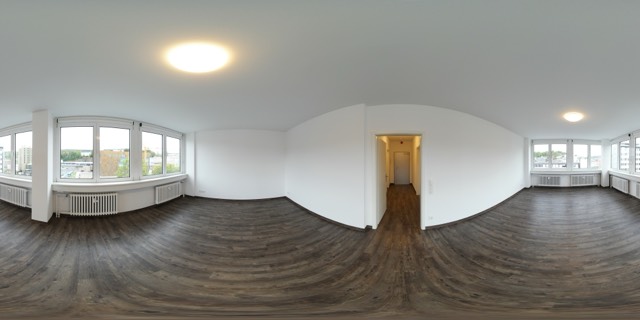
Sample apartment with 8 viewpoints · shot on iPhone and exported with Panovo · open in a new tab
Features
Panovo is deliberately not a kit with a thousand sliders – it’s the fastest way from capture to walkable tour.
Place markers right inside the panorama: navigation to the next room, info points with your own text, or external links – with colors, icons and labels. Panovo spots broken connections by itself.
For every transition you visually choose where the viewer looks when entering the room – with a crosshair on a mini panorama. No other editor makes this so direct.
No dependencies, no server logic, no tracking. Unzip, upload, done.
Turn around with your iPhone in the room – the panorama follows your movement. Perfect for immersive client presentations.
Panovo checks every image for the equirectangular 2:1 format and warns about low resolution – before your tour turns blurry.
Unlimited projects with cover, address and notes. Reorder stations, set the starting point, duplicate and archive projects – even when it’s fifty apartments.
Fully localized, with Dark Mode, haptics and support for iOS accessibility features. Built for iOS 26 with Liquid Glass design.
App screens
From a new project to publishing: twelve screens show the complete path to a finished tour. Use the arrows to page through the steps.
Who it’s for
Some already own a 360° camera and want to get more out of their shots. Others have spaces that need to be seen.
You have the camera
360° cameras save fully stitched equirectangular images in 2:1 – precisely what Panovo imports. Shoot, transfer to your iPhone, connect. No stitching, no desktop.
… and any other camera or app that produces 2:1 panoramas.
You have the spaces
Until now, “virtual tour” meant booking a service provider, paying a subscription platform, waiting for results. With Panovo you do it yourself – during the first on-site visit, finished the same day. The tour is yours: one ZIP file that runs on your own web space.
Listings with a tour get far more views and better-qualified inquiries – and no more sightseeing viewings.
Guests book what they’ve already walked through. Show every corner of your place before the trip begins.
Construction progress as a walkable record: every phase captured – for clients, buyers and documentation.
Present finished projects as walkable references that stick in the mind – and bring follow-up commissions.
Capture conditions before and after a renovation, document handovers and assessments – unambiguously.
Make rooms, halls and terraces walkable online – booking decisions are built on trust.
Document exhibitions permanently and make them accessible regardless of place and time – touring shows included.
Your store on the web: customers look around before they visit – and arrive with intent to buy.
Venue scouting from afar: couples and planners walk through your rooms before they book a visit.
Sell virtual tours as a service: shoot, connect, hand over the ZIP. No platform subscription per client.
Open your company, office or clinic to applicants: show the workplace instead of describing it – clean rooms and workshops included.
Spaces lower the threshold: people who already know your practice, gym or clubhouse come by more easily.
Privacy
Panovo works fully offline. There is no account, no cloud and no analytics – neither in the app nor in the exported tour.
Projects, panoramas and hotspots are stored exclusively on your device.
Photo selection uses the system picker – Panovo only ever sees the images you explicitly choose.
Credentials for your web server go into the iOS keychain only – never onto anyone else’s servers.
The exported tour contains no analytics scripts and loads nothing from third-party servers. Your visitors stay unobserved, too.
FAQ
Ready?
Grab the camera, capture your rooms, connect, share. Panovo takes care of everything else.